API License Keys
One key unlocks the entire Interzoid platform: APIs, wizards, database tools, and sample applications
Every Interzoid account includes a single API license key that unlocks the entire platform. The same key authenticates direct API calls, powers the browser-based wizards (including the Data Matching Wizard), drives the database connectivity tools, and runs the browser-based sample applications hosted in the cloud. When you register, your account is automatically provisioned with a license key and a number of starting credits, giving you immediate, unrestricted access to every tool Interzoid offers.
This design keeps the platform frictionless: one credential, one credit balance, and one usage history, with no separate logins, per-tool subscriptions, or additional configuration required. This guide explains how license keys work, where to find yours, how to include it in your own code, and how credit usage is tracked across the platform.
1How License Keys Work
An Interzoid API license key is a unique string of characters tied to your account. A single key works everywhere on the platform: direct API calls, wizards, database tools, MCP server, and sample apps all authenticate with the same credential. It serves three purposes:
- Authentication: The key identifies your account on every request, whether it comes from your own code, a wizard session in your browser, or a database integration job.
- Usage Tracking: Every call made with your key, from any tool or application, is logged centrally so credit consumption and request history are reported in one place on your account dashboard.
- Credit Management: Your key is linked to a single credit balance shared across the entire platform, including free starting credits and any purchased credit packages.
2Getting Your API License Key
Registering for an Interzoid account is free and takes less than a minute. Once registered:
- Create an account on the Interzoid registration page. A license key is generated automatically as part of the sign-up process.
- Receive starting credits added to your account immediately, enabling you to begin calling APIs right away without any payment.
- View your key at any time on the account management page, along with your current credit balance and recent usage.
3Using Your Key in API Calls
Every call to an Interzoid API includes your license key as the license query parameter. The API uses this value to authenticate the request and deduct the appropriate number of credits from your account.
Example API Call
$ curl "https://api.interzoid.com/getcompanymatch?license=YOUR_LICENSE_KEY&company=IBM+Corporation"Here is an example of a license key used as part of an API call, as shown in an interactive API console:

license as a standard query-string parameter. Check the API directory for the exact signature and required parameters of each endpoint.
4Using Your Key Across Interzoid Tools
The same license key that authenticates your API calls also works across every tool and application on the Interzoid platform. There is no separate login, no per-tool subscription, and no additional configuration. Every tool simply asks for your key, and all usage flows against the same account balance.
Where the License Key Is Used
| Tool | How the Key Is Entered |
|---|---|
| Data Matching Wizard | Entered in the key field in the header bar; saved in the browser for future sessions |
| Other Browser-Based Wizards | Entered in the key field at the top of each wizard (data enrichment, standardization, and more) |
| Database Connectivity Tools | Supplied as a configuration parameter alongside database connection details |
| Sample Applications | Entered in the key field within each browser-based sample app, which runs in the cloud |
| Direct API Calls | Passed as the license query-string parameter on each HTTP request |
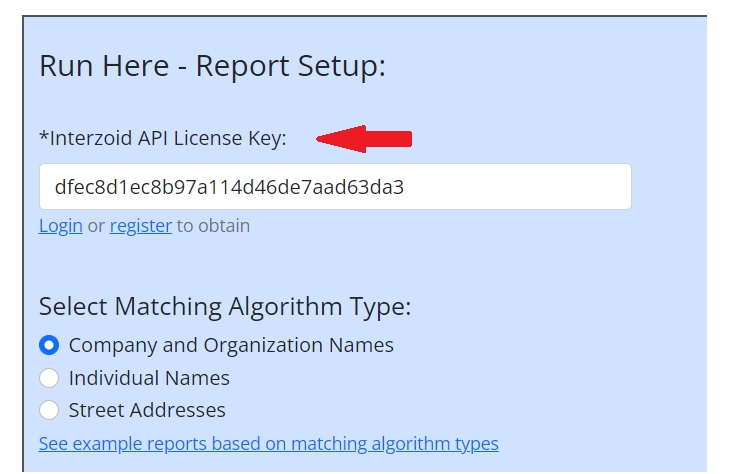
Here is an example of a license key being used in the Data Matching Wizard:
5Credits and Usage Tracking
Every request made with your license key, regardless of which tool or application originated it, consumes credits from the same account balance. Credits and usage are tracked centrally and visible in your account dashboard, giving you a single view of all activity across the platform.
| Item | Description |
|---|---|
| Starting Credits | Free credits automatically added when you register, allowing you to try any API or tool without payment |
| Per-Call Consumption | Each API call deducts a set number of credits based on the endpoint being used |
| Wizard and Tool Jobs | Credits are consumed on a per-record basis as wizards, database tools, and sample apps process your data |
| Unified Balance | A single credit pool is shared across every tool, wizard, API, and application on the platform |
| Account Dashboard | Current balance, historical usage, and credit top-ups are all managed from the account page |
Your API license key is the gateway to everything Interzoid offers. Direct API calls, the Data Matching Wizard and other browser-based wizards, the database connectivity tools, and the sample applications all authenticate with the same key and draw from the same credit balance. One credential, one balance, one place to track usage, keeping the platform frictionless and easy to adopt. Keep your key secure, monitor your balance from the account dashboard, and reach out to our support team if you have any questions.